Seller OS: the Chrome extension that runs your Fiverr like a business.

Replies, gigs, orders, clients, rankings, and today's priorities in one calm workspace. Seller OS drafts and fills for you, then waits: every Send, Save, Continue, and Publish stays in your hands.

Free plan available. No credit card for Free. Local-first data. Nothing auto-sends. Now live on the Chrome Web Store. Want launch news? Get product updates.

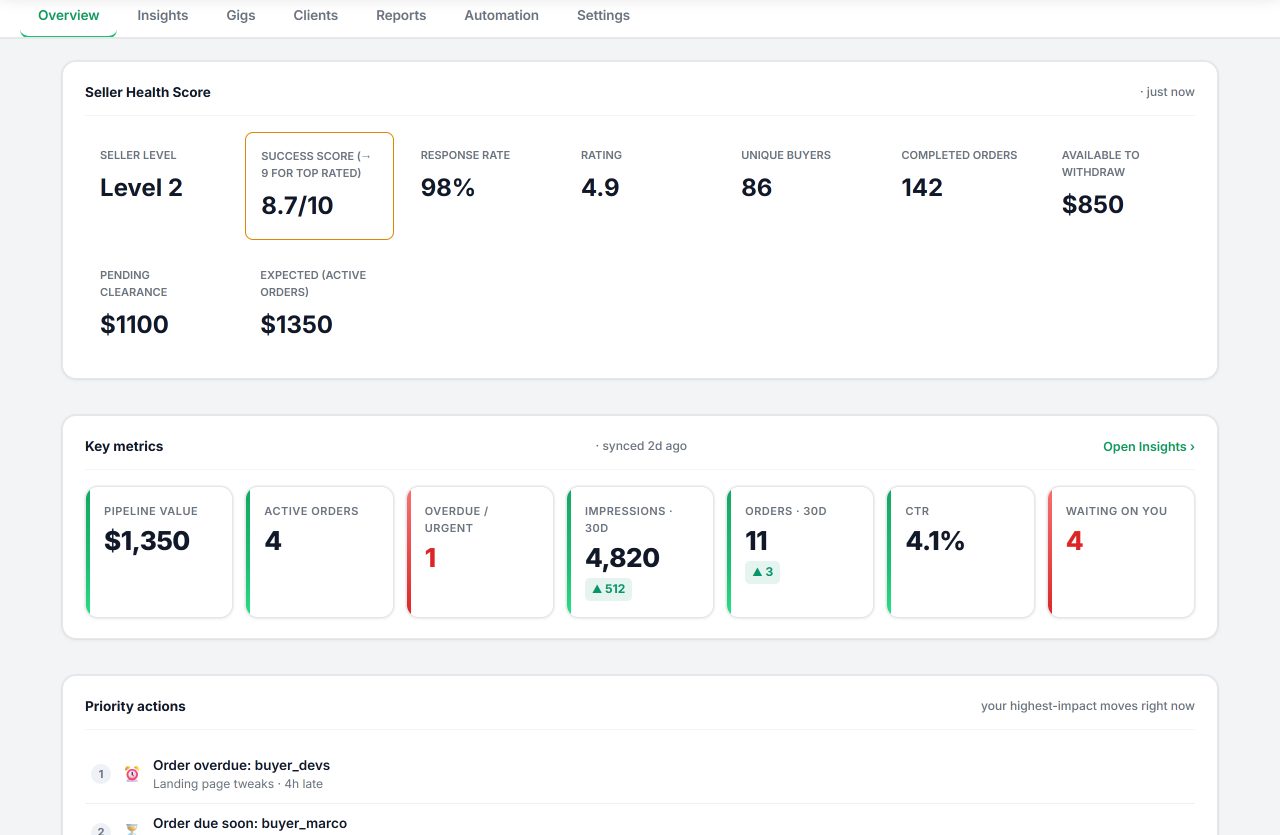
Seller OS overview dashboard with seller health score, key metrics, and priority actions
Seller health, key metrics, and priority actions in the overview dashboard.
Inbox draftsGig builder and optimizerPricing and rank trackingClient CRMMonitors and action queue

How Seller OS fits your day

Seller OS is a Chrome extension for active Fiverr sellers: it drafts inbox replies, briefs, and order messages, builds and audits gigs, tracks pricing and keyword rank, and keeps clients and reports in one local-first workspace. Install it, pick your AI engine, and work from one queue. Your Fiverr data stays in Chrome local storage; only the content needed for a request you start goes to the AI provider you choose. For the search side of the work, the Fiverr SEO tool guide shows how keyword research, gig copy, gig audits, and rank tracking fit together. If you are comparing categories first, start with the Fiverr seller tools guide.

  1. Install the Chrome extension

    Pin Seller OS, open Fiverr, and let it read the pages you already visit. No extra tabs, no new inbox to learn.

  2. Choose inbox, brief, gig, and report helpers

    Use an eligible browser AI session or your own provider API key. Paid Seller OS plans never include third-party AI credits.

  3. Review everything before it counts

    Drafts wait in the composer or form. You press Send, Save, Continue, or Publish yourself, every time.

The product tour

Eight views, one workflow: answer well, position well, price well, and follow up on time. Every screenshot shows the real Seller OS interface with synthetic demonstration data; no customer or buyer records are shown.

Fiverr Inbox assistant

A panel beside the conversation summarizes long threads, qualifies the lead, and drafts replies, offers, and follow-ups in your voice. Client value, notes, and tags sit next to the thread so the reply fits the relationship.

  • Summaries, reply drafts, offer help, and checklists
  • Nothing sends automatically; you review and send
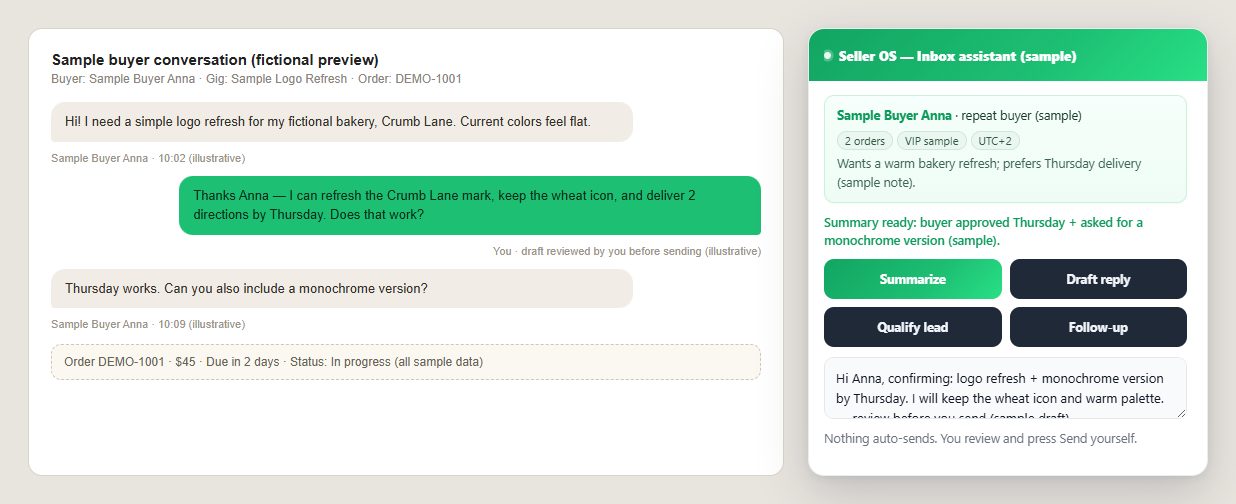
Seller OS inbox assistant panel beside a fictional buyer conversation with summary, client facts, and draft reply
The inbox preview uses illustrative data; no real buyer conversation is shown.

Analytics and overview

Your day starts with seller health, response risk, active orders, impressions, clicks, and conversion in one place, plus the three moves that matter most right now.

  • Health score, key metrics, and priority actions
  • Passive snapshots from pages you already visit
Seller OS analytics overview with health score, key metrics row, and priority actions list
Overview: health, metrics, and what to do first.

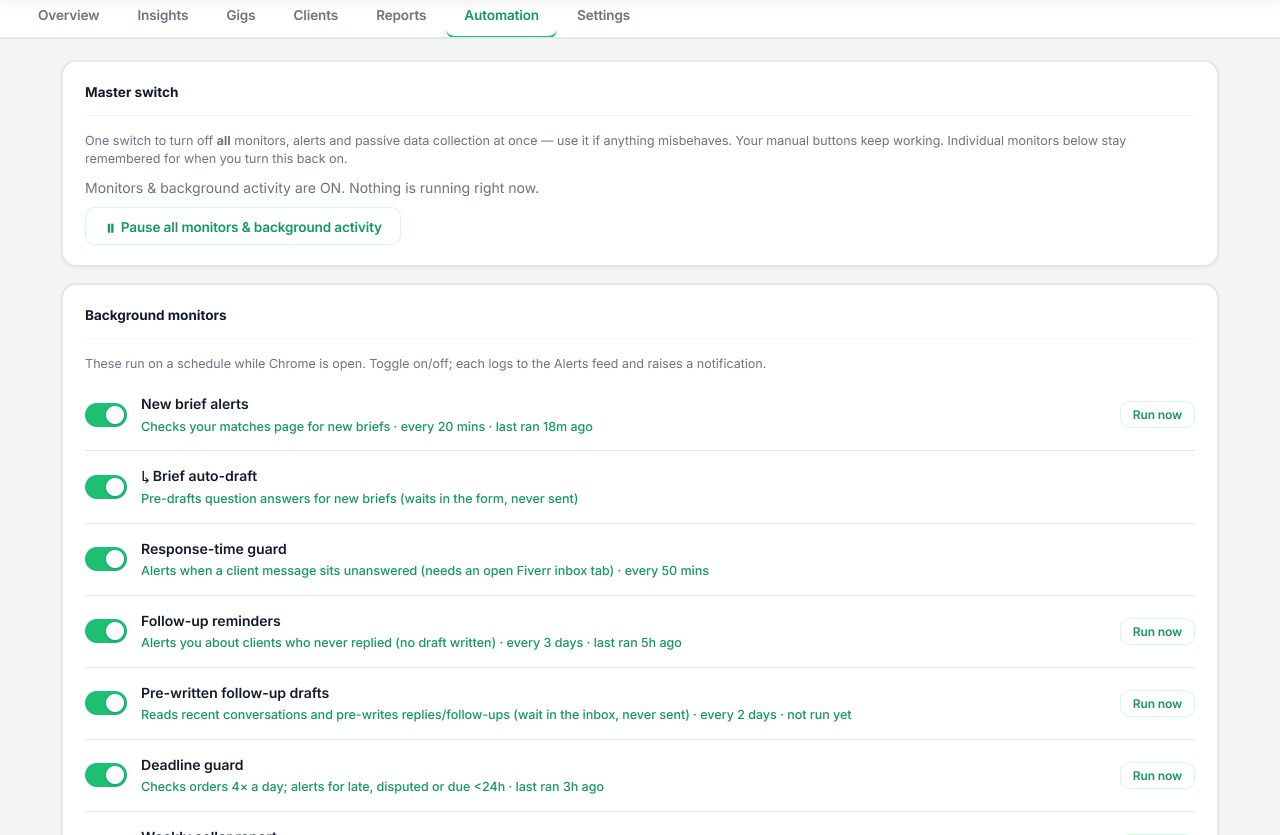
Background monitors and alerts

Pro monitors watch briefs, deadlines, follow-ups, ranks, competitors, contacts, and traffic trends while Chrome is open. Each run logs to the alerts feed and raises a notification; a master switch pauses everything at once. Manual buttons keep working while paused.

  • Brief alerts, deadline guard, follow-up reminders
  • Pro-only; Free stays manual and useful
Seller OS background monitors list with toggles for brief alerts, deadline guard, and follow-up reminders
Monitors and alerts with a single master switch.

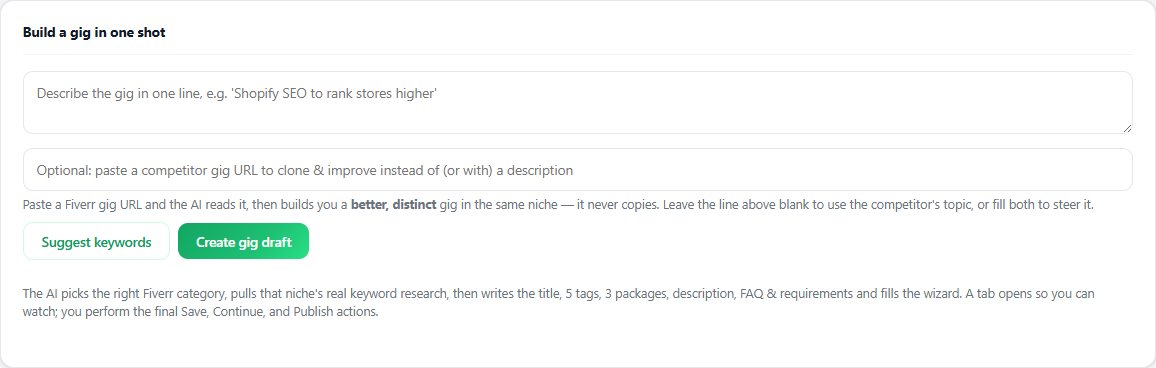
One-shot Gig Builder

Describe the gig in one line, or paste a competitor URL to position against it. Seller OS researches keywords, picks the category, writes title, tags, packages, description, FAQ, and requirements, then fills the Fiverr wizard step by step while you watch and approve.

  • Category, keyword, and package structure included
  • You complete Save, Continue, and Publish yourself
Seller OS one-shot gig builder form with idea field, competitor URL field, and keyword suggestion controls
One idea in, a structured gig draft out, wizard filled for review.

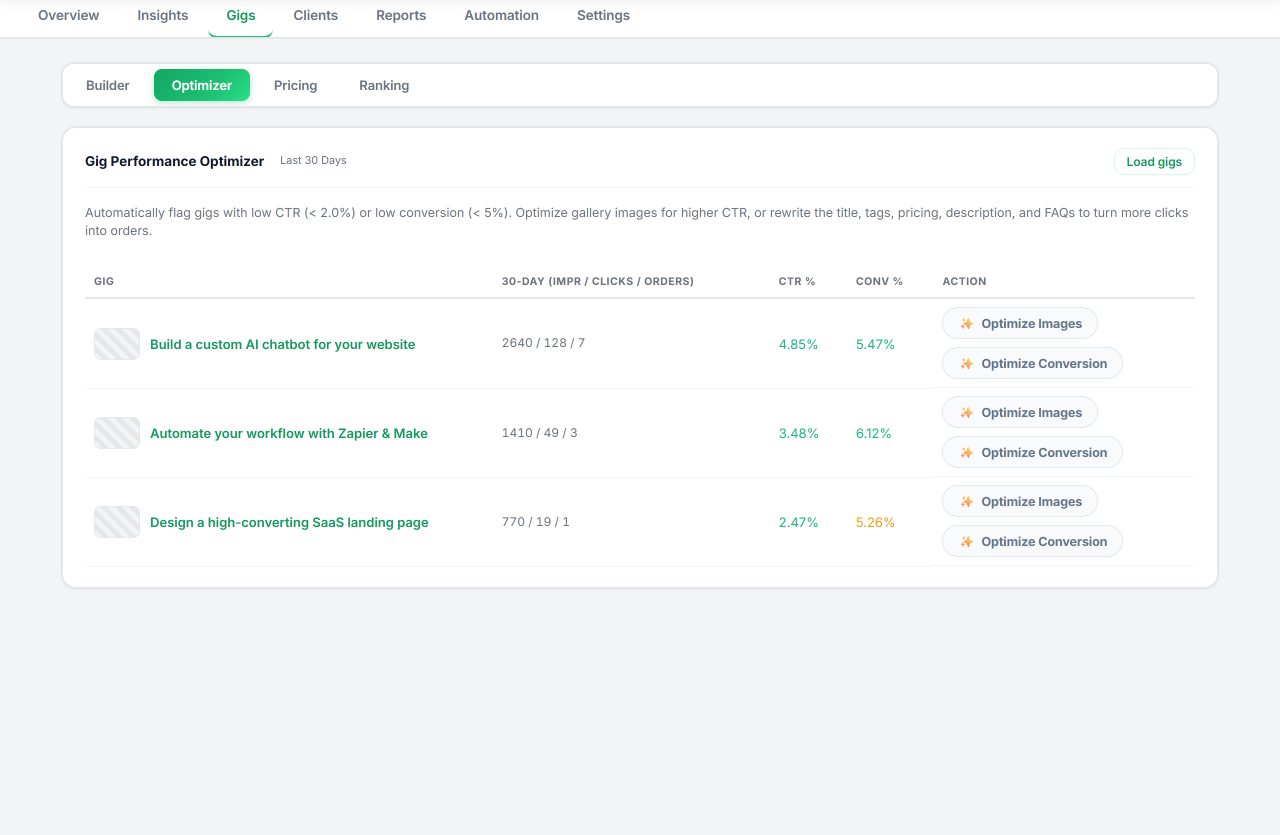
Gig Performance Optimizer

Audit a live gig against its own performance data, then apply sharper titles, tags, descriptions, gallery concepts, and conversion fixes. Every apply shows what changed and keeps history, with the final save on Fiverr left to you.

  • Copy, gallery, and conversion recommendations
  • Change history with human-controlled applies
Seller OS gig performance optimizer audit view for a live gig
Audit first, then apply only what earns its place.

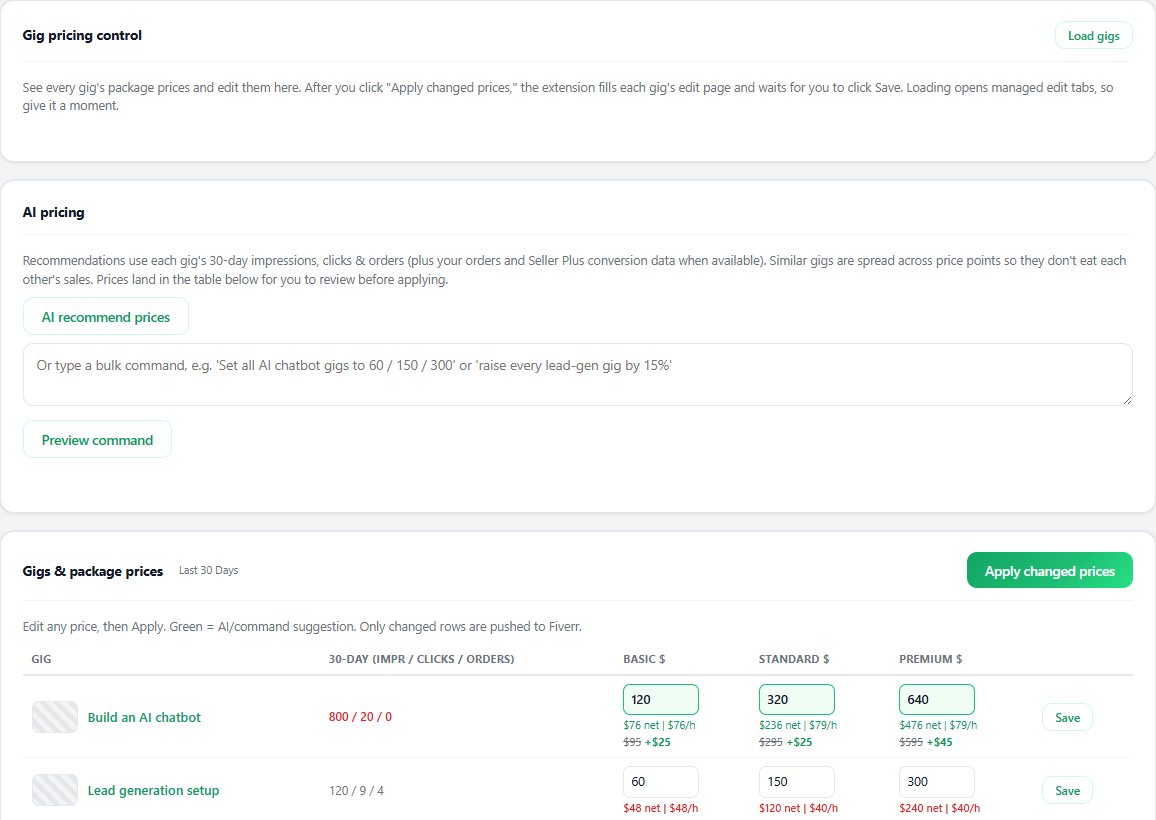
Gig pricing and rank tracking

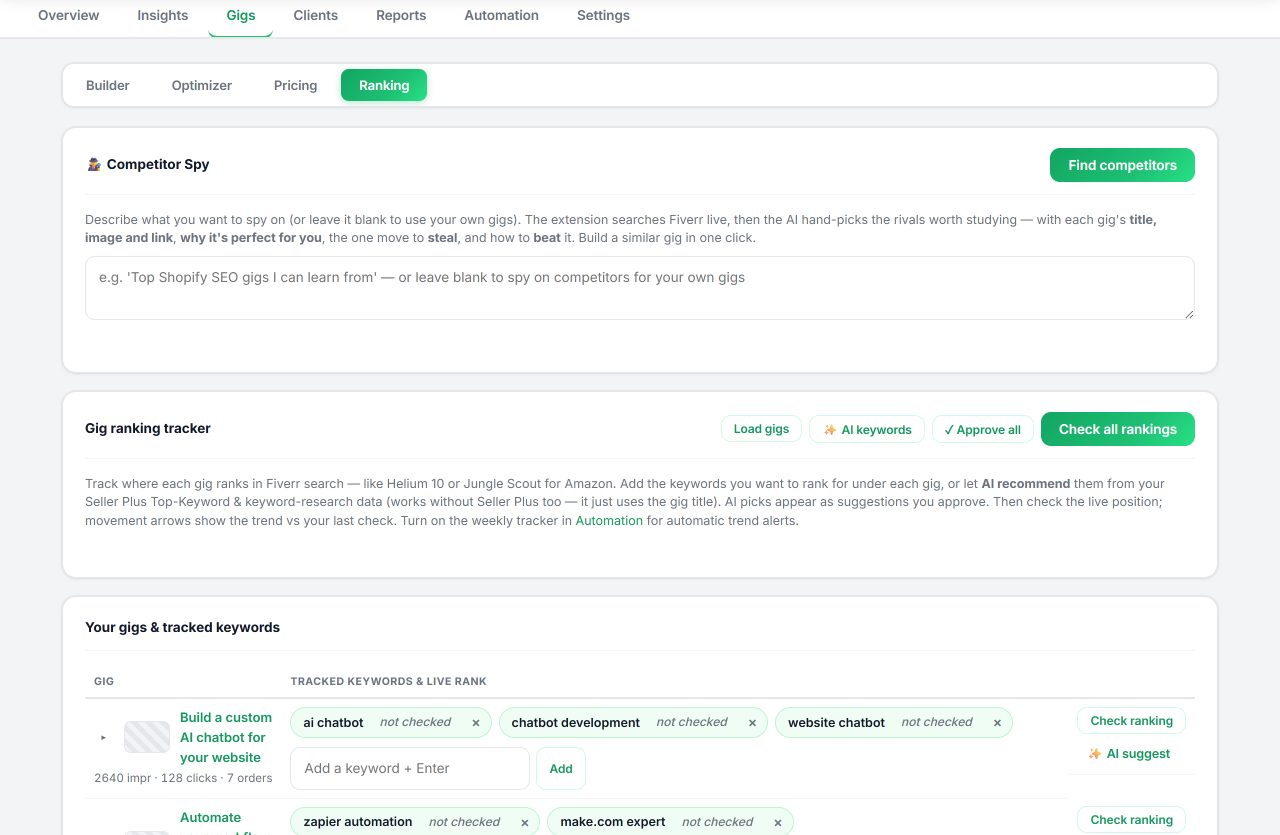
Review package prices against profit assumptions, get single or bulk recommendations, and track keyword positions and competitor moves over time. Stale snapshots never overwrite your recent applied prices. This is the tracking half of the Fiverr SEO tool workflow.

  • Package pricing review with guardrails
  • Keyword rank history and competitor tracking
Seller OS gig pricing view with package prices and recommendations
Pricing review with profit assumptions.
Seller OS keyword rank tracking with position history and movement
Rank tracking with weekly movement.

Client CRM

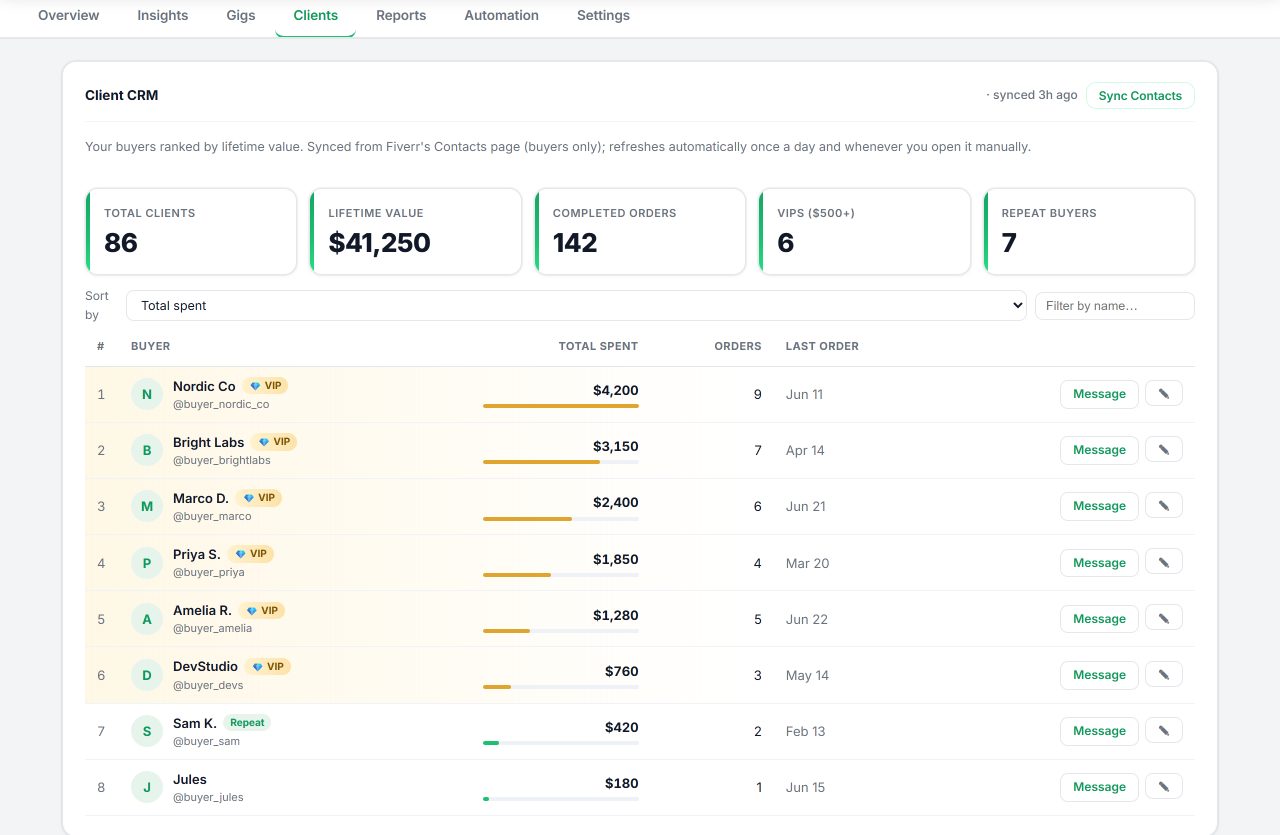
Buyers accumulate into one local client record: lifetime value, repeat history, VIP context, notes, tags, and dormant-client opportunities. The dossier follows you into the inbox so every draft respects the relationship.

  • Additive records; syncs never delete clients
  • Re-engagement drafts for dormant buyers
Seller OS client CRM with fictional buyer records, lifetime value, tags, and notes
Every buyer, one memory, ready when you reply.

Reports and action queue

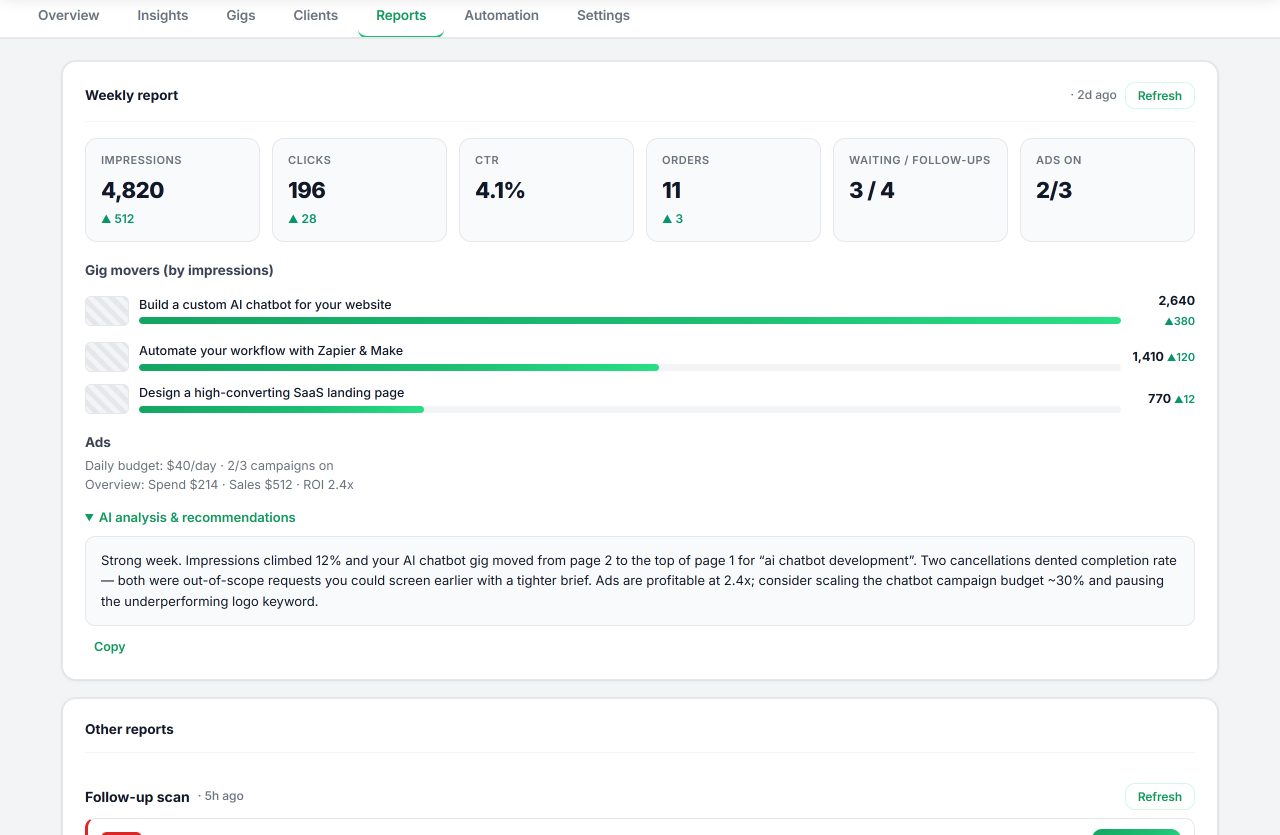
Daily briefings, weekly reports, follow-up scans, FAQ and template mining, and thumbnail ideas land in a short queue of ready-to-review actions instead of another dashboard to interpret.

  • Daily and weekly summaries from stored data
  • Follow-ups, templates, and ideas queued for review
Seller OS reports view with synthetic briefing summary and action queue items
Reports that end in a queue, not a chart graveyard.

Start free. Upgrade when Seller OS earns its place.

Your AI provider or subscription is separate. Paid plans unlock Seller OS features and usage; they do not include third-party AI credits. Paid checkout uses your Seller OS account, so use the same email at checkout.

Free
$0forever

Enough real usage to prove the workflow.

  • 5 inbox AI actions per day
  • 1 brief response per day
  • 1 gig audit per day
  • Local dashboard and passive insights
  • Manual review on every action
Get Seller OS
Lifetime
$99one time

Launch offer for sellers who prefer to own access.

  • Everything in Pro Monthly
  • No recurring Seller OS payment
  • All future 1.x updates
  • 2 browser activations
  • Priority product feedback
Get lifetime

“Unlimited” means no Seller OS daily action cap, subject to fair use, Fiverr safeguards, and the limits of your selected AI provider. Prices may change for new customers; existing subscriptions keep their purchased price. Refunds follow our Refund Policy.

Know exactly what you are installing.

Does Seller OS send messages automatically?

No. It drafts or fills content for review. You perform the final send, Save, Continue, or Publish action.

Where is my Fiverr data stored?

Business snapshots and settings stay in Chrome local storage. Only content needed for an AI request goes to the AI provider you choose. The license service never receives Fiverr conversations or analytics.

Do plans include AI credits?

No. Use an eligible browser AI session or your own provider API key. Provider billing and limits remain between you and that provider.

How do paid plans work?

Create or sign in to your Seller OS account with the same email you use at checkout, and your purchase links to your account automatically with Pro on up to two browser installations. If you bought with a different email, email billing@sellerosforfiverr.com for help linking it.

What if I want a refund?

Request one within 14 days of your initial Monthly or Lifetime purchase. See the Refund Policy for details and what to include.

Get launch news and practical Seller OS tips.

Confirm your email to receive product updates, workflow ideas, and occasional Pro offers. Unsubscribe whenever you want.

We store your address encrypted and never sell it. See our Privacy Policy.

Install Seller OS and run today with less guesswork.

Free to start. You stay in control of every message and every gig edit.

Start free